How OpsCompanion Works
How OpsCompanion builds operational context across your stack.
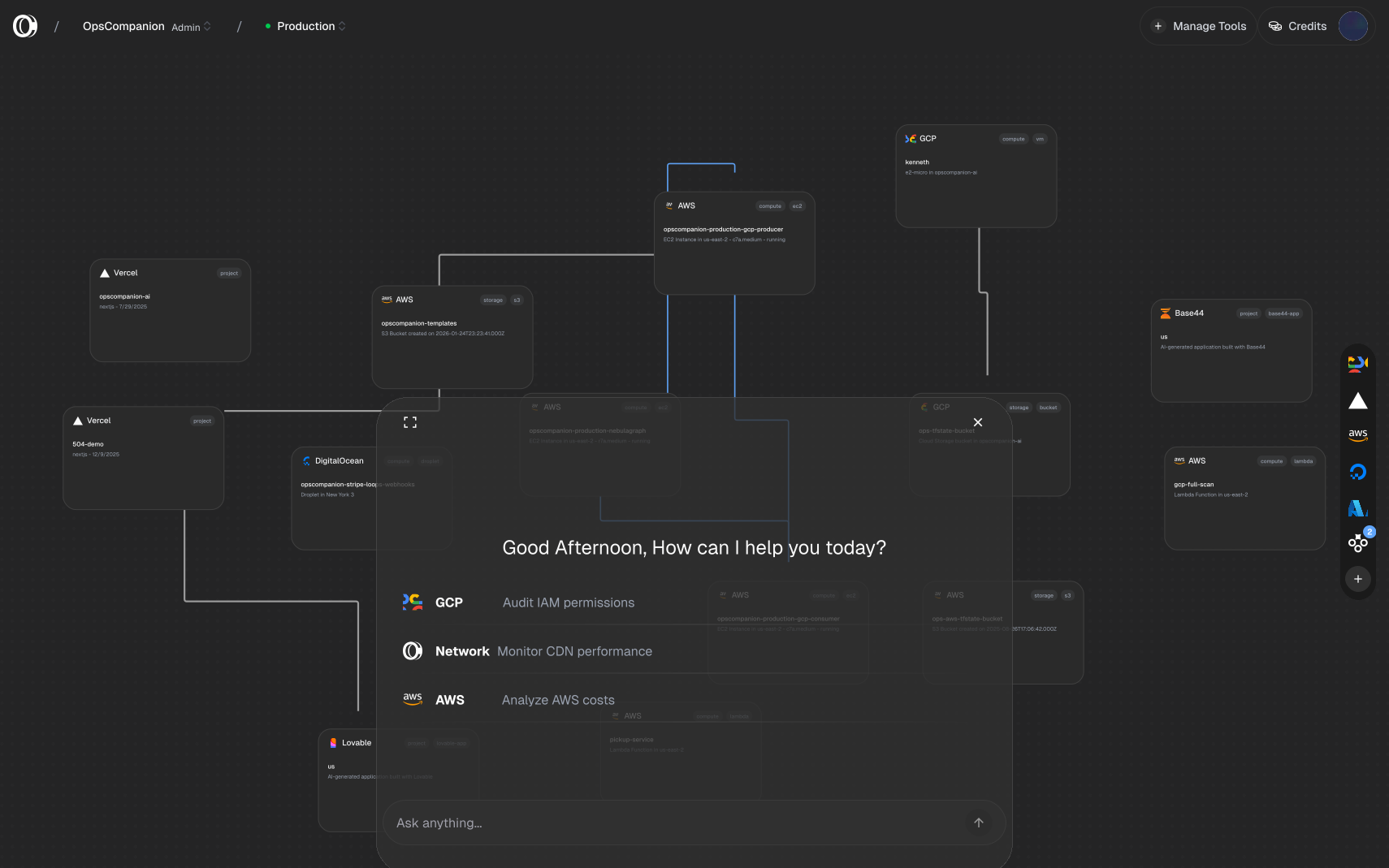
The Operational Context Layer
OpsCompanion builds a continuously updated context layer across your stack. This is not a diagram someone drew or a dashboard that shows a snapshot. It is the actual state of your infrastructure, synchronized from the systems themselves and enriched with operational memory over time.
The context layer includes:
- Every resource across your connected cloud providers
- The relationships between those resources, derived from real configuration
- A timeline of changes: what changed, when, and by whom
- Business context your team adds: ownership, purpose, dependencies that only humans know
- Operational memory from past investigations, incidents, and patterns
When something changes in production, the context updates with it. No manual updates required.
How Context is Built
1. Connect
You install integrations with your cloud providers and tools:
- Cloud providers - AWS, GCP, Azure, DigitalOcean
- Code - GitHub repositories and deployments
- Deployment platforms - Vercel projects and domains
- AI-generated apps - Lovable, Base44
Each integration uses read-only access. OpsCompanion observes your systems without modifying them.
2. Ingest
Once connected, OpsCompanion continuously ingests data across your stack:
- Resources - Every EC2 instance, Lambda function, storage bucket, database, and service
- Configuration - How each resource is configured, what permissions it has, what it connects to
- Relationships - Security groups, IAM policies, network flows, DNS records
- Changes - What changed, when, and by whom, from audit logs, commits, and deploys
- AI agent activity - Changes and actions taken by AI coding tools in your stack
This happens continuously. New resources, changes, and context appear as soon as they exist.
3. Investigate
With full context, your team can understand what is happening across the stack:
- Search - Find any resource across all connected systems
- Trace - Follow connections to see what depends on what
- Assess impact - Know what a change touches and why it matters before it ships
- Ask - Use an AI agent that knows your specific infrastructure to investigate issues
The AI agent answers questions grounded in your actual environment, not generic advice.
4. Take Action
Move from investigation to resolution:
- Correlate changes to incidents - See what changed around the time an issue started
- Generate change briefs - Summarize what was deployed and what it affects
- Draft pull requests - Create code changes directly from investigation context
- Surface patterns - Detect recurring issues and trends over time
What Gets Ingested
Infrastructure State
Resources and configuration are discovered automatically from your connected providers:
- Security group rules link compute to networking
- IAM policies link roles to resources
- Network flows show how traffic actually moves
- DNS records link domains to services
These connections update automatically as your infrastructure changes.
Resource Metadata
For each resource, OpsCompanion captures:
- Configuration and settings
- Tags and labels
- Region and availability zone
- Creation time and last modified
- Associated resources
Change History
From audit logs, provider APIs, and code repositories:
- What changed
- When it changed
- Who made the change (human or AI agent)
- What the previous state was
Business Context
The most valuable context is what machines cannot discover:
- This database is the source of truth for billing
- This Lambda function is part of the payment processing pipeline
- This S3 bucket contains customer uploads for the onboarding flow
- When this service fails, page the platform team
OpsCompanion lets you capture this knowledge and attach it directly to the resources it describes. When someone new joins the team, they can explore the stack and understand the system without asking dozens of questions.
Context-Aware AI
OpsCompanion includes an AI agent that has learned your infrastructure:
- It knows what resources you have and how they connect
- It knows what has changed recently and what is likely affected
- It remembers past incidents and how they were resolved
- It can surface patterns your team may not have noticed
Ask it:
- "What depends on this database?"
- "What changed in the last 24 hours?"
- "Who owns this service?"
- "What depends on this EC2 instance and what breaks if I take it down?"
- "Has this kind of failure happened before?"
- "How can I make this more cost effective?"
- "Am I using this resource to the best of my ability?"
- "Are there services I'm paying for that aren't being used?"
The AI grounds its answers in actual data from your environment and operational memory. It does not hallucinate resources that don't exist or relationships that aren't real.
Data Sources
The operational context layer is built from:
- Provider APIs - AWS, GCP, Azure, DigitalOcean
- OAuth connections - GitHub, Vercel, DigitalOcean
- URL-based connections - Lovable, Base44
- Audit logs - CloudTrail, Cloud Audit Logs, Activity Logs
- Code repositories - Commits, pull requests, AI agent sessions
- Manual context - Links, notes, and ownership you add
- Operational memory - Past investigations, incident outcomes, detected patterns
All data flows one direction: from your systems into OpsCompanion. Current integrations use read-only access and cannot modify your infrastructure.